8. Cross Compilation and Toolchain Files
Refresher on Cross-Compilation
Note
The following is a small referesher on cross compilation. If you feel confident in your understanding of the topic, feel free to jump to the cross-compiling with CMake section.
Let's step back a bit. At this point, the idea of code compilation should be familiar to you. We should also know that embedded systems and software is unique in that it requires code firmware to be written/compiled for an entirely different processor architecture than the system you used to develop the code with.

For instance, you might want to write an application for an STM32F1 MCU on your 64-bit Windows 10 workstation with an Intel Core i7 processor. In this instance, you would be producing a binary that would run on a 32-bit ARM Cortex M0.
- Host Machine: Windows 10 (Intel Core i7)
- Build Machine: Windows 10 (Intel Core i7)
- Target Machine: STM32F1 (ARM Cortex M0)
The takeaway is that many embedded projects require the developer to write code that will execute on a processor with a different architecture than the one they are writing firmware with. This might seem like an obvious statement but there is an underlying importance here. Part of generating the correct artifacts is passing the right compiler flags to the compiler toolchain. You certainly could do this manually, but integrating CMake or another build systems would streamline this process greatly with consistent outputs and configuratble targets. (I.e, quickly changing target architecture from command line)
Terminology
To maintain some consistentcy, there are a few terms we should know before going forward.
- Build machine: The computer that executes the build processes
- Host machine: The computer on which the software will execute
- Target machine: The machine/device on which the compiled output will run
In short cross compmilation is the process of building and compiling code for a target platform other than the host machine.
CMake and Toolchain Files
In order to setup or enable support for cross-compilation our CMake project we have to modify the CMakeLists.txt files to point to the right compiler tools. While we could do this from our top-level (or adjacent) CMakeLists.txt file, the most common convention is to use a toolchain file.
Similar to typical CMakeLists.txt files which define what (and to varying extents how) build artifacts are produced, the toolchain file shall typically dictate the toolchain, compiler, and embedded target (i.e. STM32F4 MCU, Android, Linux OS, etc.)
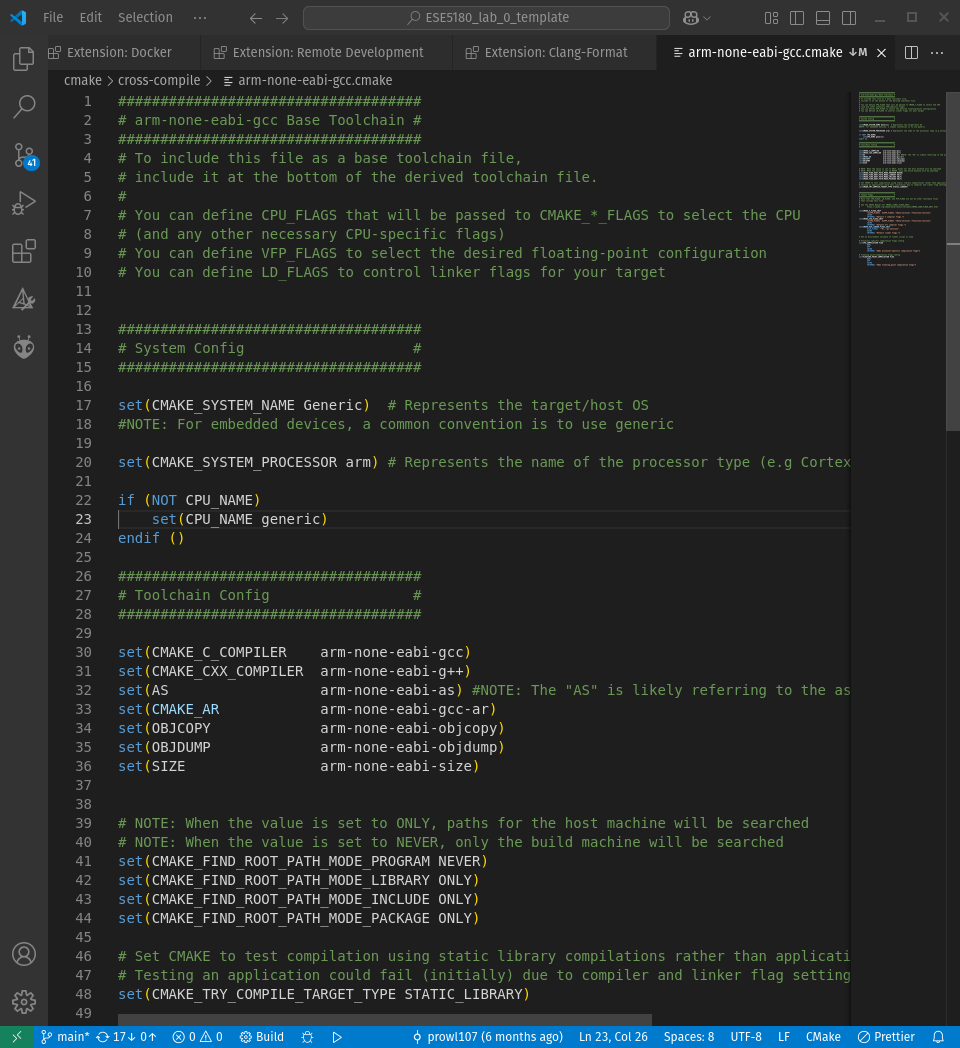
Example Toolchain File for ARM GNU Toolchain
A few things to note here about toolchain files:
- They have the ".cmake" file extension
- All the same syntax rules established by the base CMakeLists.txt file still apply here
- There are a few variables that we need to change in order for our build process to recognize the change in toolchains
- When invoking the CMake command, you must set the
CMAKE_TOOLCHAIN_FILEvariable to the path of the respective toolchain file in order for the changes to take affect
To support cross-compiling for a specific software project, CMake must to be told about the target platform via a toolchain file. The CMakeLists.txt may have to be adjusted. It is aware that the build platform may have different properties than the target platform, and it has to deal with the instances where a compiled executable tries to execute on the build host
Note on Cross Compiling with CMake
The following is directly referenced from the Mastering CMake Guide from Kitware and serves as a good footnote to the topc:
Cross-compiling has several consequences/considerations for CMake:
1. CMake cannot automatically detect the target platform.

2. CMake cannot find libraries and headers in the default system directories.

3. Executables built during cross compiling cannot be executed.
Cross-compiling support doesn’t mean that all CMake-based projects can be magically cross-compiled out-of-the-box (some are), but that CMake separates between information about the build platform and target platform and gives the user mechanisms to solve cross-compiling issues without additional requirements such as running virtual machines, etc.
Example Toolchain File Overview
Toolchain files can get extremely complex and we are only scratching the surface of what we can do with them. That said, for cross-compilation for most platforms, there are only a few areas and variables we need to focus on. We'll focus on an example toolchain file for building projects with the ARM GNU Toolchain which you can download from here.
Note
As an aside, the Embedded Artistry course, Creating a Cross-Platform Build SYstem for Embedded Projects with CMake , was extremely helpful in learning and making the content here. While the course content is not free, it is heavily currated and reviewed by professional engineers and worth considering if you want to learn more about some of the intricacies of CMake and other build systems.
System/Target Config
####################################
# System Config                    #
####################################

set(CMAKE_SYSTEM_NAME Generic)  # Represents the target/host OS
# NOTE: For embedded devices, a common convention is to use generic

set(CMAKE_SYSTEM_PROCESSOR arm) # Represents the name of the processor type (e.g Cortex M4 => ARM,  Nvidia => RiscV)

if (NOT CPU_NAME)
    set(CPU_NAME generic)
endif ()
The system config section of the toolchain file simply identifies the target platform of your project. The CMake variables we set/modify here while seemingly not important, may be consumed during the build process for some of the backend CMake processes.
| Variable | Description/Purpose |
|---|---|
| CMAKE_SYSTEM_NAME | some description |
| CMAKE_SYSTEM_PROCESSOR | some description |
| CPU_NAME | some_description |
Somewhat magically, CMake knows (or predicts) when you intend to enable cross-compilation. When the CMAKE_SYSTEM_NAME variable is updated, CMake will set the CMAKE_CROSSCOMPLING variable to true, indicating a cross-compilation build. Typically, we update the CMAKE_SYSTEM_NAME variable through the referenced toolchain file.
Toolchain Config
####################################
# Toolchain Config                 #
####################################

set(CMAKE_C_COMPILER    arm-none-eabi-gcc)
set(CMAKE_CXX_COMPILER  arm-none-eabi-g++)
set(AS                  arm-none-eabi-as) #NOTE: The "AS" is likely referring to the assembler
set(CMAKE_AR            arm-none-eabi-gcc-ar)
set(OBJCOPY             arm-none-eabi-objcopy)
set(OBJDUMP             arm-none-eabi-objdump)
set(SIZE                arm-none-eabi-size)


# NOTE: When the value is set to ONLY, paths for the host machine will be searched
# NOTE: When the value is set to NEVER, only the build machine will be searched
set(CMAKE_FIND_ROOT_PATH_MODE_PROGRAM NEVER)
set(CMAKE_FIND_ROOT_PATH_MODE_LIBRARY ONLY)
set(CMAKE_FIND_ROOT_PATH_MODE_INCLUDE ONLY)
set(CMAKE_FIND_ROOT_PATH_MODE_PACKAGE ONLY)

# Set CMAKE to test compilation using static library compilations rather than application
# Testing an application could fail (initially) due to compiler and linker flag settings
set(CMAKE_TRY_COMPILE_TARGET_TYPE STATIC_LIBRARY)
There's a decent amount going on in this section so let's look at this snippet in two parts.
1. Setting compiler / toolchain paths
set(CMAKE_C_COMPILER    arm-none-eabi-gcc)
set(CMAKE_CXX_COMPILER  arm-none-eabi-g++)
set(AS                  arm-none-eabi-as) #NOTE: The "AS" is likely referring to the assembler
set(CMAKE_AR            arm-none-eabi-gcc-ar)
set(OBJCOPY             arm-none-eabi-objcopy)
set(OBJDUMP             arm-none-eabi-objdump)
set(SIZE                arm-none-eabi-size)
When compiling for another architecture, it is expected that you have a separate cross-compilation toolchain installed. In the same vein, many of the external toolchains we want to reference are made up of a collection of multiple tools and files. Covering the purpose of each type of tool or file is outside of the scope of this document but this section in particular is simply designed to specify the path(s) to those tools/files.
| Variable | Description/Purpose |
|---|---|
| CMAKE_C_COMPILER | The full path to the C compiler |
| CMAKE_CXX_COMPILER | The full path to the C++ compiler |
| AS | Program name or full path to the toolchain assembler program |
| CMAKE_AR | The name of the program that creates archive or static libraries |
| OBJCOPY | A custom variable set to the path to the objcopy tool from the ARM GNU Toolchain. This item is invoked via a custom target. |
| SIZE | A custom variable set to the path to the objcopy tool from the ARM GNU Toolchain. This item is invoked via a custom target. |
Note
When setting the vales for these functions, if your compiler is added to your system's PATH variable, you can use the tool name or whatever it's referred to as relative to your system. Alternatively, you can also use absolute paths here but that is not a recommended approach.
2. Setting dependency search behavior
When cross-compiling, you will likely have to source libraries for your particular target architecture. For instance, the standard c library (libc) has variations between an x86_64 platform and an ARM target architecture. By the same notion, it stands to reason that the x86_64 variants of certain functions are not guarranted to work on another target platform and vice versa.
To prevent or mitigate your project being linked with the wrong functions, we can instruct CMake on how and where to search for the correct dependencies for our target. The idea behind setting these variables is that it will only search and include libraries, directories, and or programs that are designed to work with our target architecture. I.e, finding the low level ARM functions
# NOTE: When the value is set to ONLY, paths for the host machine will be searched
# NOTE: When the value is set to NEVER, only the build machine will be searched
set(CMAKE_FIND_ROOT_PATH_MODE_PROGRAM NEVER)
set(CMAKE_FIND_ROOT_PATH_MODE_LIBRARY ONLY)
set(CMAKE_FIND_ROOT_PATH_MODE_INCLUDE ONLY)
set(CMAKE_FIND_ROOT_PATH_MODE_PACKAGE ONLY)
3. Compiler Flags/Options
set(CMAKE_C_FLAGS_INIT
      "${CPU_FLAGS}  ${VFP_FLAGS} -Wextra -ffunction-sections -fdata-sections"
      CACHE
      INTERNAL "Default C compiler flags.")

set(CMAKE_CXX_FLAGS_INIT
      "${CPU_FLAGS}  ${VFP_FLAGS} -Wextra -ffunction-sections -fdata-sections"
      CACHE
      INTERNAL "Default C++ compiler flags.")

set(CMAKE_ASM_FLAGS_INIT
        "${CPU_FLAGS} -x assembler-with-cpp"
        CACHE
        INTERNAL "Default ASM compiler flags.")

set(CMAKE_EXE_LINKER_FLAGS_INIT
      "${LD_FLAGS} -Wl,--gc-sections"
      CACHE
      INTERNAL "Default linker flags.")
4. Linker Scripts
Linker scripts/files are used during the linking process to define the memory layour of your application. In essence define the start & stop addresses of where each memory region. We won't talk about how to make or modify one here. That is a topic worthy of discussion in and of itself. However, we will leave a snippet of one underneath for your refernce.
/* Entry Point */
ENTRY(Reset_Handler)

/* Highest address of the user mode stack */
_estack = ORIGIN(RAM) + LENGTH(RAM); /* end of "RAM" Ram type memory */

_Min_Heap_Size = 0x400; /* required amount of heap */
_Min_Stack_Size = 0x540; /* required amount of stack */

/* Memories definition */
MEMORY
{
  RAM    (xrw)    : ORIGIN = 0x20000000,   LENGTH = 256K
  ROM    (rx)    : ORIGIN = 0x08000000,   LENGTH = 1024K
}

/* Sections */
SECTIONS
{
  /* The startup code into "ROM" Rom type memory */
  .isr_vector :
  {
    . = ALIGN(4);
    KEEP(*(.isr_vector)) /* Startup code */
    . = ALIGN(4);
  } >ROM

  /* The program code and other data into "ROM" Rom type memory */
  .text :
  {
    . = ALIGN(4);
    *(.text)           /* .text sections (code) */
    *(.text*)          /* .text* sections (code) */
    *(.glue_7)         /* glue arm to thumb code */
    *(.glue_7t)        /* glue thumb to arm code */
    *(.eh_frame)

    KEEP (*(.init))
    KEEP (*(.fini))

    . = ALIGN(4);
    _etext = .;        /* define a global symbols at end of code */
  } >ROM

  /* Constant data into "ROM" Rom type memory */
  .rodata :
  {
    . = ALIGN(4);
    *(.rodata)         /* .rodata sections (constants, strings, etc.) */
    *(.rodata*)        /* .rodata* sections (constants, strings, etc.) */
    . = ALIGN(4);
  } >ROM

  .ARM.extab (READONLY) : /* The READONLY keyword is only supported in GCC11 and later, remove it if using GCC10 or earlier. */
  {
    . = ALIGN(4);
    *(.ARM.extab* .gnu.linkonce.armextab.*)
    . = ALIGN(4);
  } >ROM

  .ARM (READONLY) : /* The READONLY keyword is only supported in GCC11 and later, remove it if using GCC10 or earlier. */
  {
    . = ALIGN(4);
    __exidx_start = .;
    *(.ARM.exidx*)
    __exidx_end = .;/*
While linker scripts are consumed further into the compilartion process, they can interact with build systems. Namely, we can point to the path of our linker script via CMake which will then be used during the compilation and linking process.
set(LINKER_SCRIPT_PATH "${PROJECT_SOURCE_DIR}/cmake/linker_scripts/STM32F412ZGJX_FLASH.ld")

# Set linker flag arguments
set(LD_FLAGS "-T${LINKER_FILE_PATH}/${LINKER_FILE_NAME}" CACHE INTERNAL "LD_FLAGS")

# NOTE: We are making LD_FLAGS a cache variable to ensure that it is available
# to the lower-level toolchain files.
Layered Toolchain Files
Before finishing up cross-compilation and toolchain files let's take a step back to talk project structure. Much like the note we made in cmake-project-organization as our projects grow in complexity we want to make our build system code more modular. At the very least, all of our target specific configuration should not be written in a single toolchain file. This approach is typically referred to as layering or layered toolchain files. In essence, it is the practice of modularizing your build system.
The file tree below shows the differences between a single toolchain file and what it might look like using a layered toolchain approach.
| Layered Toolchain Files | Single Toolchain File |
|---|---|
┌── CMake Project Root |
┌── CMake Project Root |
Layered Toolchain Files
####################################
# arm-none-eabi-gcc Base Toolchain #
####################################
# To include this file as a base toolchain file,
# include it at the bottom of the derived toolchain file.
#
# You can define CPU_FLAGS that will be passed to CMAKE_*_FLAGS to select the CPU
# (and any other necessary CPU-specific flags)
# You can define VFP_FLAGS to select the desired floating-point configuration
# You can define LD_FLAGS to control linker flags for your target


####################################
# System Config                    #
####################################
set(CMAKE_SYSTEM_NAME Generic)  # Represents the target/host OS
#NOTE: For embedded devices, a common convention is to use generic

set(CMAKE_SYSTEM_PROCESSOR arm) # Represents the name of the processor type (e.g Cortex M4 => ARM,  Nvidia => RiscV)

if (NOT CPU_NAME)
    set(CPU_NAME generic)
endif ()

####################################
# Toolchain Config                 #
####################################

set(CMAKE_C_COMPILER    arm-none-eabi-gcc)
set(CMAKE_CXX_COMPILER  arm-none-eabi-g++)
set(CMAKE_ASM_COMPILER  arm-none-eabi-gcc)
set(AS                  arm-none-eabi-as) #NOTE: The "AS" is likely referring to the assembler
set(CMAKE_AR            arm-none-eabi-gcc-ar)
set(OBJCOPY             arm-none-eabi-objcopy)
set(OBJDUMP             arm-none-eabi-objdump)
set(SIZE                arm-none-eabi-size)


# NOTE: When the value is set to ONLY, paths for the host machine will be searched
# NOTE: When the value is set to NEVER, only the build machine will be searched
set(CMAKE_FIND_ROOT_PATH_MODE_PROGRAM NEVER)
set(CMAKE_FIND_ROOT_PATH_MODE_LIBRARY ONLY)
set(CMAKE_FIND_ROOT_PATH_MODE_INCLUDE ONLY)
set(CMAKE_FIND_ROOT_PATH_MODE_PACKAGE ONLY)

# Set CMAKE to test compilation using static library compilations rather than application
# Testing an application could fail (initially) due to compiler and linker flag settings
set(CMAKE_TRY_COMPILE_TARGET_TYPE STATIC_LIBRARY)

####################################
# Common Flags                     #
####################################
# Note that CPU_FLAGS, LD_FLAGS, and VFP_FLAGS are set by other Toolchain files
# that include this file.
#
# See the CMake Manual for CMAKE_<LANG>_FLAGS_INIT:
#   https://cmake.org/cmake/help/latest/variable/CMAKE_LANG_FLAGS_INIT.html

message("CPU Flags: ${CPU_FLAGS}")
message("VFP Flags: ${VFP_FLAGS}")
message("LD_Flags: ${LD_FLAGS}")

set(CMAKE_C_FLAGS_INIT
        "${CPU_FLAGS}  ${VFP_FLAGS} -Wextra -ffunction-sections -fdata-sections"
        CACHE
        INTERNAL "Default C compiler flags.")
set(CMAKE_CXX_FLAGS_INIT
        "${CPU_FLAGS}  ${VFP_FLAGS} -Wextra -ffunction-sections -fdata-sections"
        CACHE
        INTERNAL "Default C++ compiler flags.")
set(CMAKE_ASM_FLAGS_INIT
    "${CPU_FLAGS} -x assembler-with-cpp"
    CACHE
    INTERNAL "Default ASM compiler flags.")
set(CMAKE_EXE_LINKER_FLAGS_INIT
        "${LD_FLAGS} -Wl,--gc-sections"
        CACHE
        INTERNAL "Default linker flags.")
####################################
# cortex-m4 toolchain config       #
####################################
# Processor specific toolchain file for cortex-m4 devices/targets

####################################
# Include guard                   #
####################################

if ($ENV{ARM_CORTEX_M4_TOOLCHAIN_INCLUDED})
    return()
endif ()

set(ENV{ARM_CORTEX_M4_TOOLCHAIN_INCLUDED})

####################################
# CPU, Linker, Floating point conf #
####################################
# Set the CPU, linker, and floating point flags

set(CPU_NAME cortex-m4)
set(CPU_FLAGS "-mcpu=cortex-m4 -mthumb")
set(VFP_FLAGS "-mfloat-abi=hard -mfpu=fpv4-sp-d16")
####################################
# STM32F412 Discovery Dev Board    #
# Toolchain File                   #
####################################

# Include guard
if($ENV{stm32f412DISC_TOOLCHAIN_INCLUDED})
        return()
endif()

set(ENV{stm32f412DISC_TOOLCHAIN_INCLUDED} TRUE)

# Set linker script paths

####################################
# TODO: Set linker file name       #a
####################################
set(LINKER_SCRIPT "STM32F412ZGJX_FLASH.ld")

####################################
# TODO: Set linker file path       #
####################################
set(LINKER_SCRIPT_PATH "${PROJECT_SOURCE_DIR}/cmake/linker_scripts/STM32F412ZGJX_FLASH.ld")

# Set linker flag arguments
set(LD_FLAGS "-T${LINKER_FILE_PATH}/${LINKER_FILE_NAME}" CACHE INTERNAL "LD_FLAGS")

# NOTE: We are making LD_FLAGS a cache variable to ensure that it is available
# to the lower-level toolchain files.

# Include cortex m4 toolchain
include(${CMAKE_CURRENT_LIST_DIR}/../cross-compile/cortex-m4_hardfloat.cmake)

#include STM32CubeF4 Driver Package
include(${CMAKE_CURRENT_LIST_DIR}/../drivers/STM32CubeF4_driver_package.cmake)
Single Toolchain FIle
####################################
# STM32F412 Discovery Dev Board    #
# Unified Toolchain File           #
####################################

# Include guard
if ($ENV{STM32F412_DISC_TOOLCHAIN_INCLUDED})
    return()
endif()
set(ENV{STM32F412_DISC_TOOLCHAIN_INCLUDED} TRUE)

####################################
# System & Processor Config        #
####################################
set(CMAKE_SYSTEM_NAME Generic)
set(CMAKE_SYSTEM_PROCESSOR arm)

# Set CPU, linker, and floating point flags
set(CPU_NAME cortex-m4)
set(CPU_FLAGS "-mcpu=cortex-m4 -mthumb")
set(VFP_FLAGS "-mfloat-abi=hard -mfpu=fpv4-sp-d16")

####################################
# Toolchain Config                 #
####################################
set(CMAKE_C_COMPILER    arm-none-eabi-gcc)
set(CMAKE_CXX_COMPILER  arm-none-eabi-g++)
set(CMAKE_ASM_COMPILER  arm-none-eabi-gcc)
set(AS                  arm-none-eabi-as)
set(CMAKE_AR            arm-none-eabi-gcc-ar)
set(OBJCOPY             arm-none-eabi-objcopy)
set(OBJDUMP             arm-none-eabi-objdump)
set(SIZE                arm-none-eabi-size)

set(CMAKE_FIND_ROOT_PATH_MODE_PROGRAM NEVER)
set(CMAKE_FIND_ROOT_PATH_MODE_LIBRARY ONLY)
set(CMAKE_FIND_ROOT_PATH_MODE_INCLUDE ONLY)
set(CMAKE_FIND_ROOT_PATH_MODE_PACKAGE ONLY)

set(CMAKE_TRY_COMPILE_TARGET_TYPE STATIC_LIBRARY)

####################################
# Linker Configuration             #
####################################
# Define linker script
set(LINKER_SCRIPT "STM32F412ZGJX_FLASH.ld")
set(LINKER_SCRIPT_PATH "${PROJECT_SOURCE_DIR}/cmake/linker_scripts/${LINKER_SCRIPT}")
set(LD_FLAGS "-T${LINKER_SCRIPT_PATH}" CACHE INTERNAL "LD_FLAGS")

####################################
# Compiler & Linker Flags          #
####################################
set(CMAKE_C_FLAGS_INIT
    "${CPU_FLAGS} ${VFP_FLAGS} -Wextra -ffunction-sections -fdata-sections"
    CACHE INTERNAL "Default C compiler flags.")
set(CMAKE_CXX_FLAGS_INIT
    "${CPU_FLAGS} ${VFP_FLAGS} -Wextra -ffunction-sections -fdata-sections"
    CACHE INTERNAL "Default C++ compiler flags.")
set(CMAKE_ASM_FLAGS_INIT
    "${CPU_FLAGS} -x assembler-with-cpp"
    CACHE INTERNAL "Default ASM compiler flags.")
set(CMAKE_EXE_LINKER_FLAGS_INIT
    "${LD_FLAGS} -Wl,--gc-sections"
    CACHE INTERNAL "Default linker flags.")

####################################
# Additional Includes              #
####################################
include(${CMAKE_CURRENT_LIST_DIR}/../drivers/STM32CubeF4_driver_package.cmake)