CMake Project Organization
Why is project organization/structure important?
For simple projects, it’s not unreasonable to place every single file in your root project folder. On the same note, it’s also understandable (to an extent) to write all code in a single source file. However, as projects grow in complexity, finding files and making modifications will only get harder and harder. Fixing bugs is even more complicated when you have to sift through a 2000+ line file just to realize a small typo is causing all your issues. This doesn’t even take into account code modularity and proper interface creation that comes with nicely segmented code.
With that in mind, we should implement a simple but good project structure from the start. We don’t need an over-engineered solution here. As your project grows in complexity and size, your organization should change and update to suit your needs.
Basic Project Structure Overview
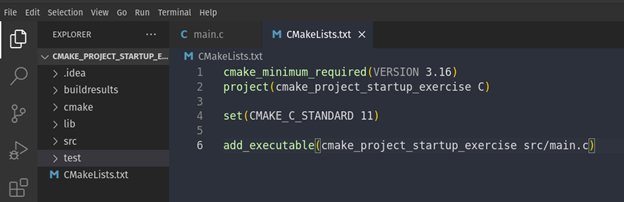
In our project, we have a few folders that should serve as a baseline template that can be used for most projects;
For most projects, adding a few folders can create the organizational structure that we seek. As a recommendation for your projects, you should create/add the following folders to your project:
| Folder Title | Description |
|---|---|
| build | Where build artifacts (object files, library files, etc) live NOTE: Invoke your cmake .. command from here! |
| cmake | Contains shared functions, modules, toolchain files, used exclusively by the build system NOTE: Most files in this directory will likely have a *.cmake file extension |
| lib | Software libraries and modules are stored here |
| test | Handles unit tests, module tests, integration tests, and anything related to testing your application |
Here is another great guide for how to structure more complex projects! As an aside, you might consider adding a documentation and or a debug folders for easy access to version-controlled documents and testing incremental builds.
We shall provide a template for easy project startup and we'll practice using this layout in the first exercise set.